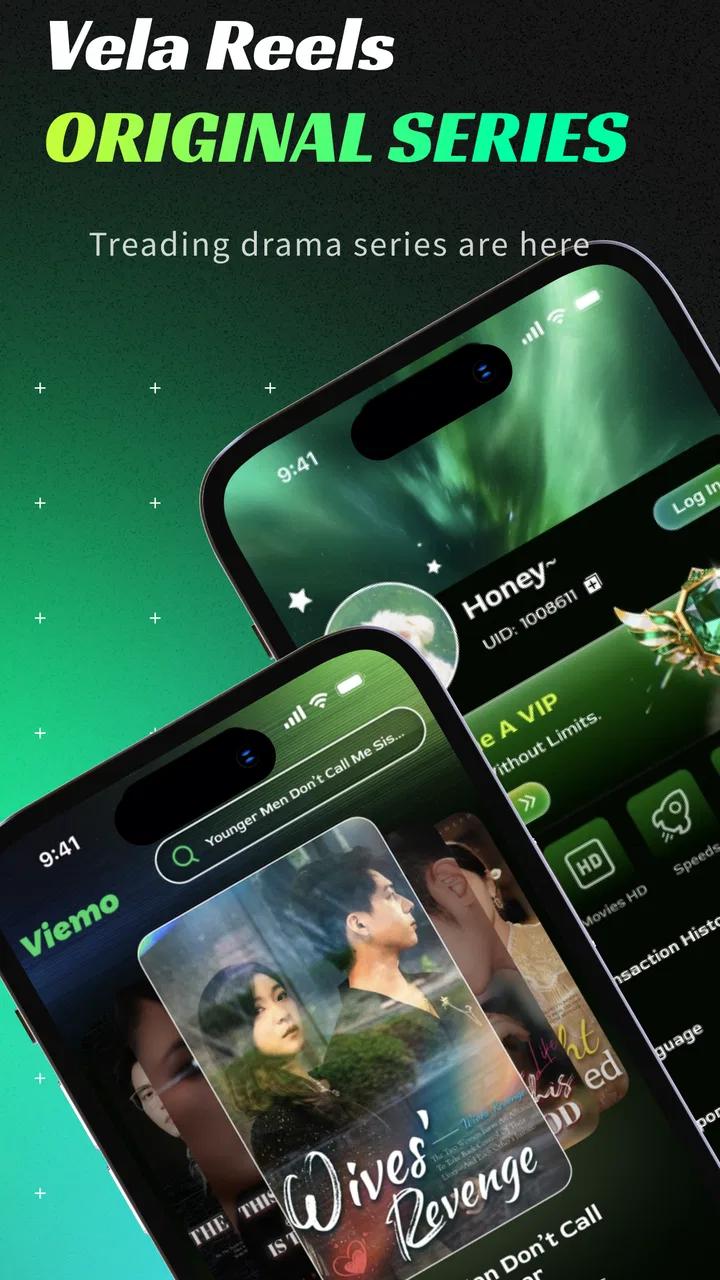
Vela Reels
- 4.7
- Rating
- 500.00K
- Installs
- Free
- Price

 Analysis by App-foxy
I spent time with Vela Reels as a short-drama entertainment app, and my first impression was simple: it is built for quick viewing rather than for settling in with a long film or a full television episode. The idea is appealing when I have a few spare minutes, especially because each story is presented in a compact format that makes it easy to watch one segment and stop. The app is free to download, carries an Everyone age rating, and comes from Racing Runner club.
Its store summary positions it as a way to watch short dramas while earning pocket money on the side. I would treat that second promise carefully. The entertainment side is the part I could judge directly from normal use; any reward-oriented activity should be approached as an optional extra rather than as a dependable source of income. That distinction matters, because the strongest reason to install this app is its bite-sized drama format, not the expectation of meaningful earnings.
How Vela Reels works for different viewers and situations
I look at how the app’s short-drama format fits different routines, from a quick wait to a more deliberate viewing break. A useful way to judge it is to notice whether compact stories make entertainment easier to fit into your day or simply encourage you to keep watching. That distinction leads naturally to the practical trade-offs.
You May Also Like
 Google Keep - Notes and lists
Google Keep’s Quiet Growth Shows the Appeal of Simpler Notes
As mobile work gets busier, Google Keep keeps winning a simple contest: capture a thought quickly, find it later, and get on with the day.

 Blood Strike: 2.5 Anniversary
Blood Strike’s Loadouts Turn Every Drop Into a Tactical Gamble
A close look at Blood Strike’s custom loadouts: how fast access to signature weapons reshapes its battle royale rhythm, rewards preparation, and narrows the gap between fights.

 Pandora - Music & Podcasts
Pandora’s Music Is Easy to Start, but Harder to Recover
Pandora’s strength is its low-effort path from a seed to a station. Its weak spot is how much confidence it asks you to place in connection, setup, and quiet recovery.

 8 Ball Pool
8 Ball Pool Is Built on Rivalries, Rematches, and Routine
A close look at the rivalries, rematches, shared routines, and unanswered safety questions that turn a quick pool match into a persistent mobile community.

 Samsung Music
Samsung Music’s Quiet Strength Is Playing What You Already Own
Its reach comes less from spectacle than from dependable access to a personal library. That simplicity is both the app’s strongest retention engine and its ceiling.

 AccuWeather: Weather Radar
AccuWeather Review: A Quick, Clear Forecast for Everyday Decisions
For everyday plans, the best forecast is the one you can understand quickly. AccuWeather makes rain timing, radar, and local conditions easy to act on, with a few trade-offs.
More From Our News Desk



Readability and navigation during short viewing sessions
The short-form design is the app’s clearest advantage. I do not need to reserve a large block of time before opening it. A quick session can fit into a commute, a lunch break, or the few minutes before an appointment. That makes the experience less demanding than a conventional streaming service, where choosing a film or episode can take longer than the time I actually have available.
For readers who prefer clear, uncomplicated choices, this format can feel approachable. The app’s purpose is easy to understand: browse short dramas, start watching, and decide whether to continue. That directness is useful for people who find large entertainment catalogs tiring. Instead of comparing hundreds of full-length titles, I can sample a compact story and move on if it does not hold my attention.
There is also a practical benefit for people who have difficulty maintaining concentration for long periods. Short episodes reduce the pressure to remember a complicated plot across a long sitting. I can watch in small pieces and return later without feeling that I have lost an entire evening. Still, short does not automatically mean easy to follow. Fast storytelling can move through character introductions, conflict, and cliffhangers quickly, so viewers who need more time to process dialogue or visual changes may prefer to pause often.
I found it helpful to use the app with a simple personal routine: browse when I have time, choose one story rather than opening several at once, and stop after a natural break. This avoids the familiar short-video trap of endlessly switching between clips. For someone who becomes overwhelmed by rapid choices, deciding on a single drama before viewing makes the experience calmer and more intentional.
The current version is 1.1.8, and it runs on Android 8.0 or later. That gives the app a reasonably broad starting point for Android users with older devices, although compatibility alone does not guarantee the same comfort on every screen. A smaller phone may make text, buttons, or visual details harder to inspect, while a larger display can make reading and watching more relaxed.
One detail I would like every potential user to consider is the difference between simple navigation and comfortable navigation. An app can be easy to open while still requiring effort from someone with low vision, attention-related difficulties, or limited dexterity. I would not assume that every control is equally easy for every person. Before committing to long sessions, I recommend checking whether the text, icons, and touch targets feel manageable on your own device.
Motor and sensory considerations while watching
Short dramas can be a good match for viewers who tire during extended interaction. The main activity is watching rather than performing a complex sequence of taps, so the app may be less physically demanding than an action game or a heavily interactive entertainment app. If I only want to relax, I can engage with the story without needing fast reactions or precise repeated gestures.
That said, the viewing experience still depends on ordinary phone interaction. Selecting a title, starting content, moving through screens, and handling any prompts requires touch control. Someone with tremors, reduced fine-motor control, or difficulty holding a phone steadily may find frequent tapping less comfortable than someone else. A stand, larger device, or external accessibility settings could make the overall setup easier, but those improvements come from the surrounding device rather than from a feature I can attribute to the app itself.
For sensory-sensitive viewers, the compact format has two sides. A short segment can be easier to stop when the experience becomes tiring. On the other hand, dramatic storytelling often relies on quick visual changes, emotional intensity, and attention-grabbing presentation. I would use a lower-volume setting, take breaks between segments, and avoid watching in a dark room if screen brightness becomes uncomfortable. These are small habits, but they make a noticeable difference during repeated sessions.
Audio is another important consideration. Anyone who depends on spoken dialogue may want to test the app in a quiet environment and with headphones or a speaker setup that makes voices easy to distinguish. Anyone who watches without sound should check whether the story remains understandable through on-screen information. I would not promise that every piece of content offers the same level of support for silent viewing, so this is one of the first practical checks I would make before recommending it to a viewer who relies on captions or visual context.
A useful workaround for people who lose track of fast scenes is to treat each short drama as a sequence to be sampled, not consumed in one rush. Pause at the end of a scene, briefly recall who is involved, and then continue. This sounds obvious, but it is especially helpful when a story uses cliffhangers or introduces several characters close together. The app’s short format saves time, yet it can also compress information.
People who experience motion sensitivity should pay attention to how their own device and the individual video presentation affect them. I would begin with a brief session rather than assuming that short clips will automatically be comfortable. If the visual style feels tiring, the best decision may be to stop rather than force the app into a viewing routine.
Using it in everyday situations
The most convincing use case for me is the in-between moment: waiting for a friend, sitting in a reception area, or taking a break after finishing a small task. In those situations, a full episode feels too long and casual social feeds can become repetitive. Vela Reels gives me a middle option: enough narrative to feel like entertainment, but not so much that I need to reorganize my day.
Imagine a commuter with ten quiet minutes before reaching the next stop. A short drama can fill that gap, but the commuter should also consider the environment. If the train is noisy, dialogue may be difficult to follow. If the phone is being held with one hand while standing, browsing may be awkward. In that situation, choosing content before boarding or waiting until seated is more sensible than trying to operate the app while moving.
It can also work for people who share a household with others and rarely control the television. A phone-based short drama does not require a large screen or a fixed schedule. However, private viewing brings its own trade-off: a small display may be less comfortable for someone with limited vision, and headphones may not suit people who need to remain aware of nearby sounds.
The app may appeal to viewers who enjoy serialized drama but do not want to invest immediately in a long-running show. Sampling a short story lowers the commitment. I can decide quickly whether the tone, pacing, and characters suit me. This is different from a traditional streaming service, where a title may take several minutes to become interesting and where abandoning it can feel like wasting more time.
The reward language may attract users who want entertainment with an additional incentive. My advice is to keep the two activities mentally separate. Watch because the dramas are enjoyable, and only explore the pocket-money element if its conditions are clear to you. Do not let a reward goal push you into longer sessions than you actually want. In practical terms, the app is better viewed as a short-drama service with an extra possibility than as a financial tool.
Where it differs from familiar entertainment alternatives
Compared with a conventional streaming platform, Vela Reels is more suitable for fragmented time. Traditional services are usually stronger when I want high-production, long-form viewing and a stable evening activity. This app is more convenient when I want a quick narrative without committing to a film or a full episode.
Compared with general short-video feeds, the drama focus gives my viewing a clearer purpose. A mixed feed can offer comedy, news, tutorials, and random clips in the same session. That variety is useful when I want surprise, but it can also make the experience feel scattered. A short-drama app is a better fit when I want stories rather than an unpredictable stream of topics.
The trade-off is depth. A long series has more room for character development, slower emotional changes, and detailed settings. Short dramas have to move quickly, which can make them easier to sample but less satisfying for viewers who prefer patient storytelling. I would choose a conventional service for a planned movie night and this app for small pockets of free time.
Another difference is the cost structure. The app itself is free, but in-app purchases range from $0.99 to $29.99 per item. That means I would not hand the phone to a child without first explaining that free access and optional spending are different things. The Everyone rating describes the age category, not a guarantee that every family will find every story or purchase prompt equally suitable.
Remaining barriers worth considering before installing
The first barrier is the uncertainty that can surround any app combining entertainment and rewards. Users need to pay attention to what an activity actually requires before spending time on it or making a purchase. I would avoid treating promotional language as a promise of regular earnings. If the main appeal for you is financial return, this is probably not the right app to depend on.
The second barrier is the possibility of information density. Short dramas are efficient, but efficiency can work against viewers who need slower pacing, larger text, repeated context, or more time between decisions. I would recommend testing one short session with the phone held in the way you normally use it. That reveals more than a general accessibility label because comfort depends on your eyesight, hearing, motor control, attention, and surroundings.
Device age may also affect comfort even though Android 8.0 is the minimum operating system. An older phone may technically run the app but provide a less pleasant experience if loading, battery life, display size, or touch responsiveness is already a concern. I would make sure the device has enough charge before a longer session and avoid judging the app solely from a crowded or unstable network environment.
Privacy-conscious users should make their own careful decision when installing any entertainment app. I would read the permission requests and account prompts shown on the device before proceeding, rather than approving everything automatically. This is especially important if the app is being used by a child or by someone who needs help managing digital accounts and purchases.
There is also a social barrier: short-form viewing can quietly become a habit. Because each segment feels manageable, it is easy to continue beyond the time originally planned. My practical solution is to decide on a stopping point before opening the app. This is not a criticism unique to one title or one developer; it is a real trade-off of entertainment designed around brief, repeatable sessions.
Finally, people who need robust accessibility controls should compare their personal requirements with the actual experience on their phone. I would not install it expecting a substitute for a dedicated accessibility-focused reader, audio platform, or fully captioned video service. If reliable text enlargement, comprehensive captions, screen-reader clarity, or very simple hands-free use is essential, a different category of app may be the safer choice.
Who will enjoy it most
I think Vela Reels is best for adults and families looking for lightweight drama entertainment in short intervals, provided they are comfortable with the app’s touch-based viewing flow and optional purchase model. It suits people who often say they have time for ten minutes but not for a full episode. It is also a reasonable choice for viewers who like sampling stories quickly before deciding whether to continue.
It is less suitable for someone seeking a serious replacement for a major streaming library, a guaranteed earning platform, or a carefully controlled accessibility experience. Viewers who want long-form storytelling may find the pacing too compressed. People who cannot comfortably read small interface elements, distinguish fast scenes, or operate a touchscreen may need another option unless their device setup makes the experience easier.
The app has attracted a 4.7 average from around 12 thousand ratings, and it has passed 500 thousand installs. Those figures suggest that many people are finding value in the format, but they should not replace a personal accessibility test. A popular app can still be uncomfortable for a particular viewer, especially when vision, hearing, motor control, or sensory tolerance differs from the majority experience.
My inclusive verdict after using the app
My overall view is positive but measured. Vela Reels makes short dramas convenient, and its compact storytelling is genuinely useful when I have a small amount of free time. The free entry point lowers the barrier to trying it, while the Everyone rating makes it broadly positioned for general audiences. Racing Runner club has created something that is easy to understand at a glance: open the app, find a brief story, and watch when a full-length program would be inconvenient.
Its inclusive value comes mainly from flexibility. I can stop quickly, watch privately, and choose a session that matches my available energy. That helps people with busy schedules or limited concentration. Yet flexibility is not the same as complete accessibility. The app still depends on a readable screen, manageable touch interaction, understandable audiovisual presentation, and a viewing environment that works for the individual.
My strongest recommendation is to begin with one short session and evaluate four things honestly: Can you read the controls without strain? Can you operate them comfortably? Can you follow the drama at its pace? Can you stop without feeling pushed into spending or continuing? If the answers are yes, this is a convenient entertainment option worth keeping on your phone.
If any answer is no, I would choose a service whose controls, captions, pacing, or content format more directly match your needs. For everyone else, the best way to use Vela Reels is as a flexible short-drama break, not as a replacement for every other kind of entertainment or a promise of dependable pocket money. That honest expectation makes the app easier to enjoy and helps each viewer decide whether its compact format truly fits everyday life.
FAQs for Vela Reels
01What is Vela Reels, and what can I do with it?
Vela Reels is a short-form video platform focused on discovering, watching, and sharing entertaining vertical clips. After installing the app, users can browse a personalized feed, interact with creators, and potentially upload their own content, depending on the features available in their region. It is designed for quick viewing sessions, with content recommendations that generally adapt to your interests and activity.
02Is Vela Reels free to download and use?
Vela Reels can generally be downloaded and used without an upfront purchase, although availability and included features may vary between Android and iOS versions. As with many social video applications, the service may be supported by advertising, optional purchases, or other monetization tools. Before downloading, check the app-store listing for current pricing details, subscriptions, and any in-app purchase information.
03Do I need to create an account to use Vela Reels?
You may be able to open Vela Reels and watch some public videos without immediately creating an account, but registration is usually required for interactive features. An account may be needed to follow creators, like or comment on videos, save content, customize recommendations, or publish your own reels. Review the sign-up options and privacy permissions carefully before providing personal information.
04Is Vela Reels safe and suitable for children?
Vela Reels may contain user-generated videos, so the material can vary widely in tone, language, themes, and suitability. Although reporting, blocking, moderation, or filtering tools may be available, these controls cannot guarantee that every unsuitable video will be removed immediately. Parents should review the app’s age rating, privacy policy, and parental-control options, and supervise younger users’ activity.
05What permissions and internet connection does Vela Reels require?
Because Vela Reels is built around streaming and possibly uploading videos, it requires an internet connection and may use a significant amount of mobile data, especially when watching content over cellular networks. Depending on the features you use, the app may request access to notifications, the camera, microphone, photos, or storage. Grant only the permissions needed for your preferred functions.
Pros
- Simple interface makes browsing short videos quick and intuitive.
- Smooth vertical scrolling keeps content discovery engaging.
- Useful sharing options make sending reels to friends easy.
- Personalized recommendations improve as you watch and interact.
- The app offers a convenient way to discover trending creators.
Cons
- Content quality can vary significantly between different creators.
- Frequent short videos may encourage extended
- time-consuming browsing.
- Recommendations may become repetitive after prolonged use.
- Some features may require a stable internet connection to work well.
- Privacy-conscious users may dislike extensive personalization and tracking.

Vela Reels
Gallery